






2026 年 05 月 19 日
SSH の PQC 対応:AlmaLinux 10.1 でのハイブリッド鍵交換と各種クライアント接続検証
はじめに
PQC(Post Quantum Cryptography、耐量子計算機暗号)への対応が急がれている背景の一つに「Harvest Now, Decrypt Later (HNDL)」攻撃の脅威があります。これは、悪意のある第三者に現在の暗号通信が収集され、将来、量子コンピューターが実用化された後に秘密が解読されてしまうという脅威です。さまざまな機密情報が含まれる暗号通信は、今すぐにでも保護を検討する必要があると考えられています。
以前の当社 Blog 「AlmaLinux 10 で PQC (耐量子計算機暗号) をお試し」シリーズや、「AlmaLinux 10.1で PQC が標準搭載:TLS 鍵交換を検証」では、TLS (Transport Layer Security) 暗号通信における鍵交換や、署名について紹介しました。本稿では、TLS によらない暗号通信である SSH について、PQC 対応アルゴリズムへの対応状況を整理します。
SSH とは
SSH(Secure Shell)は、サーバー管理やファイル転送において欠かせない、インターネット標準プロトコルで、TLS 同様、RSA や楕円曲線暗号 (ECDH や ECDSA) に依存しているため、HDNL 攻撃の対象となります。
PQC 対応 SSH
IETF(Internet Engineering Task Force) では、FIPS における PQC アルゴリズム標準化と平行し、SSH プロトコルにおける PQC 対応が検討され、現在の " 堅牢な " 古典暗号と PQC を組み合わせる「ハイブリッド方式」で業界標準化が進められています。
暗号通信の肝になる鍵交換については以下のようになります。
| 識別子(代表) | 鍵交換 | ハッシュ | 代表的な実装 | |
|---|---|---|---|---|
| PQC | 古典 | 古典 | ||
| sntrup761x25519-sha512 | Streamlined NTRU Prime 761 | ECDH (Curve25519) | SHA-512 | OpenSSH 8.5 (2021) 以降 |
| mlkem768x25519-sha256 | ML-KEM-768 (FIPS 203) |
ECDH (Curve25519) |
SHA-256 | OpenSSH 9.9 (2024) 以降 |
例えば、ハイブリッド方式 mlkem768x25519-sha256 では、FIPS 203 標準である ML-KEM-768 と、実績ある Curve25519(ECDH) の両方で鍵交換を行い、両方を " 混ぜて " 暗号通信の共有鍵とすることで、両アルゴリズムによる保護を行うものになります。具体的には、ML-KEM-768 と Curve25519 のそれぞれで生成された共有シークレットを結合し、それを鍵派生関数に通すことで、最終的な 1 つのセッション鍵を生成します。これにより、攻撃者は両方のアルゴリズムを同時に破らない限り通信内容を復号できません。結果として、「古典暗号が量子計算機で破られても PQC が守り」、「PQC に万一欠陥が見つかっても古典暗号が守る」という、二重の安全性を確保した方式となっており、従来の暗号技術と次世代の技術を組み合わせた、移行期における理想的な方式です。
なお、SSH の PQC 署名アルゴリズム対応については、その目的が「今、目の前の通信相手が本物か」を証明すること(認証)であり、量子計算機が実用化されるまでは既存の署名でも十分になりすましを防げ、鍵交換に比べて緊急度が低いと判断されているため、標準化は進められていますが、まだ普及していません。
Linux ディストリビューションでの対応状況
Linux ディストリビューションでは、SSH の実装として OpenSSH が広く使われていますが、それぞれが採用しているバージョンや方針により、対応が異なります。
| ディストリビューション | ディストリビューションメジャーバージョン | OpenSSH バージョン |
mlkem768x25519-sha256 | sntrup761x25519-sha512 |
|---|---|---|---|---|
| Debian GNU/Linux | 12 (Bookworm) | 9.2 | ✗ | ✓ |
| 13 (Trixie) | 10.0 | ✓ | ✓ | |
| Ubuntu | 22.04 LTS | 8.9 | ✗ | ✓ |
| 24.04 LTS | 9.6 | ✗ | ✓ | |
| 25.04 | 9.9 | ✓ | ✓ | |
| Red Hat Enterprise Linux / MIRACLE LINUX / AlmaLinux | 9 | 8.7 | ✗ | △※1 |
| 9.7 | 8.7 | ✗ | △※1 | |
| 10 | 9.9 (*) | △※1 | △※1 | |
| 10.1 | 9.9 | ✓ | △※1 |
- ※1
- デフォルトでは利用不可。要設定(サポート対象外を含む)。
RHEL や AlmaLinux 10 では、当初は暗号ポリシーにより無効化されていましたが、10.1 のリリースにより、デフォルトで有効になりました。
AlmaLinux 10.1 における PQC 対応 SSH
AlmaLinux 10.1 では、OpenSSH 9.9 が採用されており、PQC と古典暗号のハイブリッドによる鍵交換方式にデフォルトで対応しています。
これを確認してみましょう。
$ rpm -qa "openssh-*"
openssh-clients-9.9p1-11.el10.alma.1.x86_64
openssh-server-9.9p1-11.el10.alma.1.x86_64
$ ssh -V
OpenSSH_9.9p1, OpenSSL 3.5.1 1 Jul 2025
OpenSSH 9.9 ベースのパッケージがインストールされていることが確認できました。
次に、サポートしている鍵交換アルゴリズムを確認します。
$ ssh -Q kex
diffie-hellman-group1-sha1
diffie-hellman-group14-sha1
diffie-hellman-group14-sha256
diffie-hellman-group16-sha512
diffie-hellman-group18-sha512
diffie-hellman-group-exchange-sha1
diffie-hellman-group-exchange-sha256
ecdh-sha2-nistp256
ecdh-sha2-nistp384
ecdh-sha2-nistp521
curve25519-sha256
curve25519-sha256@libssh.org
sntrup761x25519-sha512
sntrup761x25519-sha512@openssh.com
mlkem768x25519-sha256
ここで表示される一覧は、組み込まれているアルゴリズムの一覧であって、通常利用されるわけではなく、起動時のオプションや設定ファイルで利用するアルゴリズムが決まります。
デフォルト値を見てみましょう。
クライアント側(/etc/ssh/ssh_config から間接的に読み込まれる)
$ cat /etc/crypto-policies/back-ends/openssh.config
(略 )
KexAlgorithms mlkem768x25519-sha256,curve25519-sha256,curve25519-sha256@libssh.org,ecdh-sha2-nistp256,ecdh-sha2-nistp384,ecdh-sha2-nistp521,diffie-hellman-group-exchange-sha256,diffie-hellman-group14-sha256,diffie-hellman-group16-sha512,diffie-hellman-group18-sha512
(略 )
サーバー側(/etc/ssh/sshd_config から間接的に読み込まれる)
$ cat /etc/crypto-policies/back-ends/opensshserver.config
(略 )
KexAlgorithms mlkem768x25519-sha256,curve25519-sha256,curve25519-sha256@libssh.org,ecdh-sha2-nistp256,ecdh-sha2-nistp384,ecdh-sha2-nistp521,diffie-hellman-group-exchange-sha256,diffie-hellman-group14-sha256,diffie-hellman-group16-sha512,diffie-hellman-group18-sha512
(略 )
クライアントとしても、サーバーとしても、デフォルトで 、PQC 対応ハイブリッド鍵交換である mlkem768x25519-sha256 が有効化されていることがわかります。
実際の利用時にどのアルゴリズムで行われているかは、クライアント側で -vv オプションを付与することで簡便に知ることができますので、試してみましょう。
1) AlmaLinux 10.1 クライアントから AlmaLinux 10.1 サーバーへの接続
$ ssh -v -v localhost
(略 )
debug1: Local version string SSH-2.0-OpenSSH_9.9
debug1: Remote protocol version 2.0, remote software version OpenSSH_9.9
(略 )
debug2: local client KEXINIT proposal
debug2: KEX algorithms: mlkem768x25519-sha256,curve25519-sha256,curve25519-sha256@libssh.org,ecdh-sha2-nistp256,ecdh-sha2-nistp384,ecdh-sha2-nistp521,diffie-hellman-group-exchange-sha256,diffie-hellman-group14-sha256,diffie-hellman-group16-sha512,diffie-hellman-group18-sha512,ext-info-c,kex-strict-c-v00@openssh.com
(略 )
debug2: peer server KEXINIT proposal
debug2: KEX algorithms: mlkem768x25519-sha256,curve25519-sha256,curve25519-sha256@libssh.org,ecdh-sha2-nistp256,ecdh-sha2-nistp384,ecdh-sha2-nistp521,diffie-hellman-group-exchange-sha256,diffie-hellman-group14-sha256,diffie-hellman-group16-sha512,diffie-hellman-group18-sha512,ext-info-s,kex-strict-s-v00@openssh.com
(略 )
debug1: kex: algorithm: mlkem768x25519-sha256
(略 )
クライアント、サーバーの双方から鍵交換 (KEX) アルゴリズムの提示が行われ、最終的にハイブリッド方式 mlkem768x25519-sha256 が選ばれたことがわかります。
2) AlmaLinux 9.7 クライアントから AlmaLinux 10.1 サーバーへの接続
$ ssh -v -v al-10-1
(略 )
debug1: Local version string SSH-2.0-OpenSSH_8.7
debug1: Remote protocol version 2.0, remote software version OpenSSH_9.9
(略 )
debug2: local client KEXINIT proposal
debug2: KEX algorithms: curve25519-sha256,curve25519-sha256@libssh.org,ecdh-sha2-nistp256,ecdh-sha2-nistp384,ecdh-sha2-nistp521,diffie-hellman-group-exchange-sha256,diffie-hellman-group14-sha256,diffie-hellman-group16-sha512,diffie-hellman-group18-sha512,ext-info-c,kex-strict-c-v00@openssh.com
(略 )
debug2: peer server KEXINIT proposal
debug2: KEX algorithms: mlkem768x25519-sha256,curve25519-sha256,curve25519-sha256@libssh.org,ecdh-sha2-nistp256,ecdh-sha2-nistp384,ecdh-sha2-nistp521,diffie-hellman-group-exchange-sha256,diffie-hellman-group14-sha256,diffie-hellman-group16-sha512,diffie-hellman-group18-sha512,ext-info-s,kex-strict-s-v00@openssh.com
(略 )
debug1: kex: algorithm: curve25519-sha256
(略 )
サーバーは mlkem768x25519-sha256 を含む提示をしましたが、クライアントは対応しておらず、古典的な(ただし一般的な DH 方式よりは強いとされる)curve25519-sha256 が選ばれたことがわかります。
3) AlmaLinux 10.1 クライアントから AlmaLinux 9.7 サーバーへの接続
$ ssh -v -v al-9-7
(略 )
debug1: Local version string SSH-2.0-OpenSSH_9.9
debug1: Remote protocol version 2.0, remote software version OpenSSH_8.7
(略 )
debug2: local client KEXINIT proposal
debug2: KEX algorithms: mlkem768x25519-sha256,curve25519-sha256,curve25519-sha256@libssh.org,ecdh-sha2-nistp256,ecdh-sha2-nistp384,ecdh-sha2-nistp521,diffie-hellman-group-exchange-sha256,diffie-hellman-group14-sha256,diffie-hellman-group16-sha512,diffie-hellman-group18-sha512,ext-info-c,kex-strict-c-v00@openssh.com
(略 )
debug2: peer server KEXINIT proposal
debug2: KEX algorithms: curve25519-sha256,curve25519-sha256@libssh.org,ecdh-sha2-nistp256,ecdh-sha2-nistp384,ecdh-sha2-nistp521,diffie-hellman-group-exchange-sha256,diffie-hellman-group14-sha256,diffie-hellman-group16-sha512,diffie-hellman-group18-sha512,kex-strict-s-v00@openssh.com
(略 )
debug1: kex: algorithm: curve25519-sha256
(略 )
クライアントは mlkem768x25519-sha256 を含む提示をしましたが、サーバーは対応しておらず、curve25519-sha256 が選ばれたことがわかります。
OpenSSH 10.2 における PQC 非対応警告
OpenSSH のバージョン 10.2 では、PQC 対応の鍵交換アルゴリズムを利用していない場合、パスワード入力などの認証の前に、クライアントに警告する機能が導入されています。
** WARNING: connection is not using a post-quantum key exchange algorithm.
** This session may be vulnerable to "store now, decrypt later" attacks.
** The server may need to be upgraded. See https://openssh.com/pq.html
このオプションは、WarnWeakCrypto を no-pq-kex に設定して抑制できます。例えば、 ~/.ssh/config で以下を記述します。
WarnWeakCrypto no-pq-kex
MacOS における対応状況
Apple MacOS 26.3.1(Tahoe) には OpenSSH 10.2 が同梱されています。
% ssh -V
OpenSSH_10.2p1, LibreSSL 3.3.6
% ssh -Q kex
diffie-hellman-group1-sha1
diffie-hellman-group14-sha1
diffie-hellman-group14-sha256
diffie-hellman-group16-sha512
diffie-hellman-group18-sha512
diffie-hellman-group-exchange-sha1
diffie-hellman-group-exchange-sha256
ecdh-sha2-nistp256
ecdh-sha2-nistp384
ecdh-sha2-nistp521
curve25519-sha256
curve25519-sha256@libssh.org
sntrup761x25519-sha512
sntrup761x25519-sha512@openssh.com
mlkem768x25519-sha256
PQC 対応ハイブリッド鍵交換のほか、先述した PQC 非対応接続に関する警告にも対応しています。
例を示します。
% ssh -v -v al-9-7
(略 )
debug1: Local version string SSH-2.0-OpenSSH_10.2
debug1: Remote protocol version 2.0, remote software version OpenSSH_8.7
(略 )
debug1: kex: algorithm: curve25519-sha256
(略 )
** WARNING: connection is not using a post-quantum key exchange algorithm.
** This session may be vulnerable to "store now, decrypt later" attacks.
** The server may need to be upgraded. See https://openssh.com/pq.html
(略 )
Windows での対応状況
マイクロソフト Windows 11 にはコマンドラインの SSH クライアントが同梱されていますのでバージョンなどを確認してみましょう。
C:¥>ssh -V
OpenSSH_for_Windows_9.5p2, LibreSSL 3.8.2

C:¥>ssh -Q kex
diffie-hellman-group1-sha1
diffie-hellman-group14-sha1
diffie-hellman-group14-sha256
diffie-hellman-group16-sha512
diffie-hellman-group18-sha512
diffie-hellman-group-exchange-sha1
diffie-hellman-group-exchange-sha256
ecdh-sha2-nistp256
ecdh-sha2-nistp384
ecdh-sha2-nistp521
curve25519-sha256
curve25519-sha256@libssh.org
執筆時点の Windows 11 25H2(OS ビルド 26200.8037) においては、PQC 対応の鍵交換アルゴリズムは実装されていないようです。
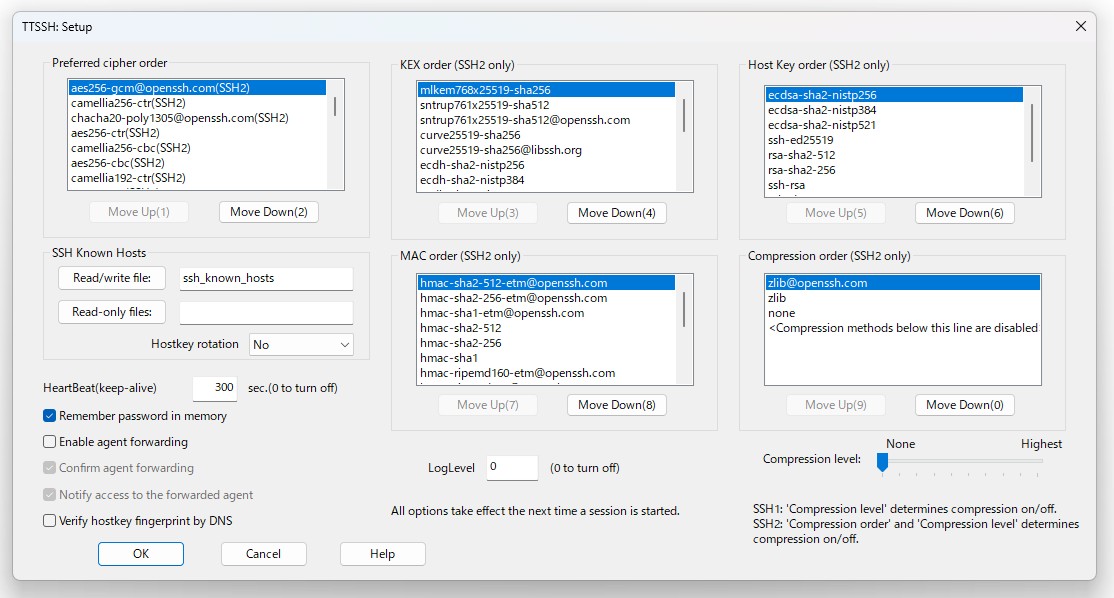
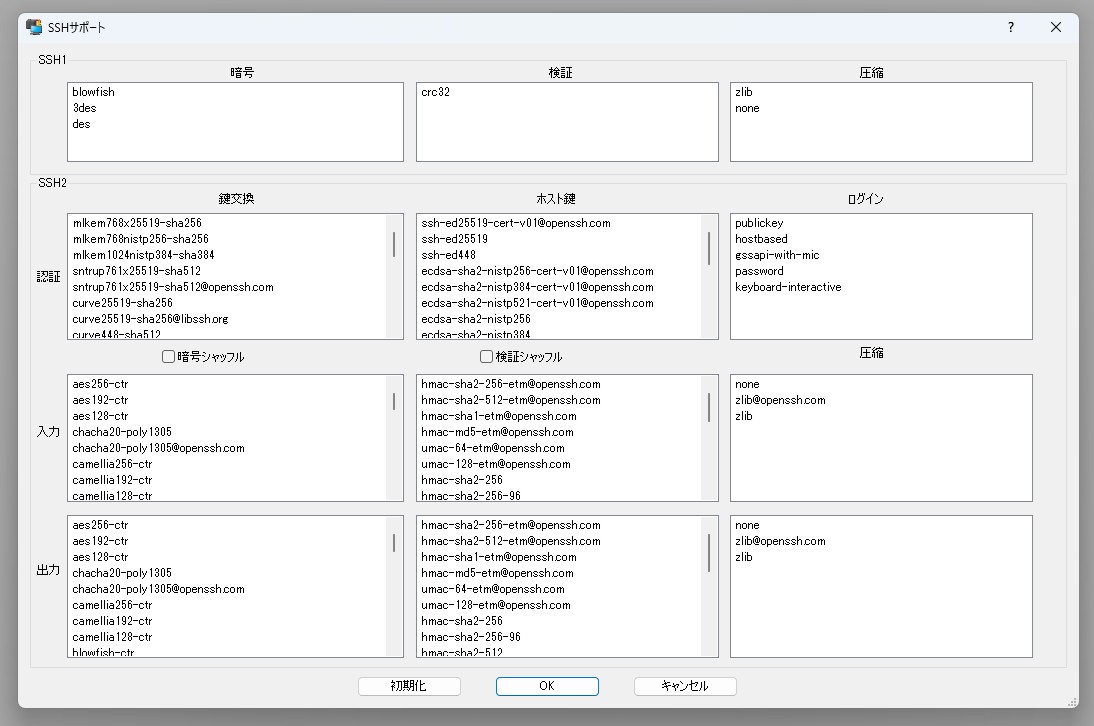
一方、Windows 用端末エミュレーターの定番でもある Tera Term[1] や RLogin[2] は、最新版で PQC 対応ハイブリッド鍵交換に対応しています。
Tera Term の設定画面
RLogin の設定画面
Tera Term を例に、AlmaLinux 10.1 サーバーに接続してみます。
サーバー上でファイアウォール設定でポートをあけ、OpenSSH サーバーのデバッグモードを有効にして待ち受けます。
# firewall-cmd --zone public --add-port 10022/tcp
success
# /usr/sbin/sshd -d -d -p 10022
Tera Term から接続すると以下のような出力が出ます。
(略 )
debug1: Local version string SSH-2.0-OpenSSH_9.9
debug1: Remote protocol version 2.0, remote software version TTSSH/3.6.0 Win32
(略 )
debug2: local server KEXINIT proposal [preauth]
debug2: KEX algorithms: mlkem768x25519-sha256,curve25519-sha256,curve25519-sha256@libssh.org,ecdh-sha2-nistp256,ecdh-sha2-nistp384,ecdh-sha2-nistp521,diffie-hellman-group-exchange-sha256,diffie-hellman-group14-sha256,diffie-hellman-group16-sha512,diffie-hellman-group18-sha512,ext-info-s,kex-strict-s-v00@openssh.com [preauth]
(略 )
debug2: peer client KEXINIT proposal [preauth]
debug2: KEX algorithms: mlkem768x25519-sha256,sntrup761x25519-sha512,sntrup761x25519-sha512@openssh.com,curve25519-sha256,curve25519-sha256@libssh.org,ecdh-sha2-nistp256,ecdh-sha2-nistp384,ecdh-sha2-nistp521,diffie-hellman-group18-sha512,diffie-hellman-group16-sha512,diffie-hellman-group14-sha256,diffie-hellman-group-exchange-sha256,diffie-hellman-group14-sha1,ext-info-c,kex-strict-c-v00@openssh.com [preauth]
(略 )
debug1: kex: algorithm: mlkem768x25519-sha256 [preauth]
(略 )
鍵交換アルゴリズムとして両者から mlkem768x25519-sha256 が提示され(クライアントは sntrup761x25519-sha512 も提示)、mlkem768x25519-sha256 が選ばれたことが確認できました。
まとめ
AlmaLinux 10.1 を含む最新ディストリビューションと新しいクライアントの組み合わせで、PQC に守られた暗号通信は実用に入りつつあります。また、従来のクライアントの互換性を維持したまま、PQC 対応のハイブリッド接続も可能なことが確認できました。
対応ハードウェアの登場やさらなる規格制定を待っている部分もありますが、業界の対応は確実に進展しています。特に長期の利用が見込まれるようなケースでは今から情報を収集し対応を検討しても遅くはないでしょう。
当社では、超長期サポートを実現する MIRACLE LINUX や AlmaLinux をはじめ、組込み向けの EMLinux など、さまざまな OSS・基盤製品やサポートをご用意しております。なにかご質問やご要望などがありましたらお気軽にご相談ください(問合せ先:pqctrial@cybertrust.co.jp)。
関連 Web サイト
この記事の著者

「R&D センター」は、2022 年 4 月 1 日に立ち上げられた研究開発部門です。
サイバートラストは、お客様のサービスの信頼性を支えるプラットフォーマーとして、先々のプラットフォームや社会制度、他がどのように変化するのかを考えています。
さまざまな IoT 機器が普及し、OSS や AI やブロックチェーンが活用され、量子コンピュータが発達する一方で、それらによる新たなセキュリティリスクも生じると想像される未来においても、引き続き、安心・安全な社会を実現するため、サイバートラストが果たす役割を含め、研究開発を進めています。
* AlmaLinux は、The AlmaLinux OS Foundation の商標です。
* Linux は、Linus Torvalds 氏の日本およびその他の国における登録商標または商標です。
* Red Hat、Red Hat Enterprise Linux は、米国およびその他の国における Red Hat, Inc. およびその子会社の商標または登録商標です。
* その他、記載されている会社名、製品名、サービス名は、当社または各社、各団体の商標もしくは登録商標です。